Incremental Mount
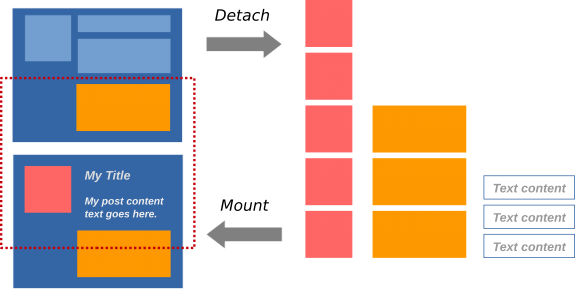
Even though components provide flatter view hierarchies and perform layout off the main thread, the mount operation (creating, recycling and attaching views and drawables) can still have a cost on the UI thread for very complex components, especially for the ones containing many views.
Since there's no benefit of maintaining views outside the viewport, Incremental Mount plays a pivotal role in boosting overall performance by ensuring such views are excluded from the view hierarchy.
It is easy to confuse Litho's Incremental Mount feature with similar Android features such as view recycling in a RecyclerView. However, unlike Android's RecyclerView, Incremental Mount operates on a view-by-view resolution, rather than entire list items as in a RecyclerView.
This means that unlike with a RecyclerView, when an individual view has exited the viewport, it will be unmounted from the view hierarchy, even if its container is partially visible within the viewport.
With Incremental Mount enabled (which it is by default), the LithoView will only mount enough content to fill its visible region and unmount (and recycle) components that are no longer visible.
How It Works
When a LithoView is scrolled or its visible bounds change:
- Litho calculates which components are now visible
- Components entering the viewport are mounted (views created and attached)
- Components leaving the viewport are unmounted (views detached and recycled)
This happens automatically for built-in scrollable containers like LazyList, LazyGrid, LazyStaggeredGrid, VerticalScroll, and HorizontalScroll.
Built-in Container Support
When using a prebuilt collection component such as LazyList, LazyGrid, LazyStaggeredGrid, or scrollable containers (VerticalScroll, HorizontalScroll), the framework will seamlessly perform Incremental Mount.
LazyList (RecyclerView)
LazyList combines RecyclerView's item recycling with Litho's incremental mount for optimal performance:
LazyList {
    children(items = myItems, id = { it.id }) { item ->
        MyItemComponent(item = item)
    }
}
VerticalScroll / HorizontalScroll
For non-recycling scrollable content, Litho's incremental mount handles view optimization:
VerticalScroll(style = Style.flex(grow = 1f)) {
    Column {
        for (item in items) {
            child(MyItemComponent(item = item))
        }
    }
}
ViewPager Integration
ViewPager presents a challenge for incremental mount because it doesn't provide reliable callbacks when content moves on/off screen during page transitions. Litho solves this with IncrementalMountHelper, which automatically attaches page change listeners to detect scroll events and trigger notifyVisibleBoundsChanged(VisibilityChangeReason.SCROLL) on nested LithoViews.
How IncrementalMountHelper Works
When a LithoView is attached, IncrementalMountHelper traverses up the view hierarchy looking for ViewPager ancestors. When found, it registers an OnPageChangeListener that calls notifyVisibleBoundsChanged(VisibilityChangeReason.SCROLL) during onPageScrolled() events, ensuring components mount/unmount correctly as pages slide in and out of view.
ViewPager (Legacy)
For the legacy ViewPager, this integration is automatic. No additional configuration is needed—just nest your LithoView inside a ViewPager and incremental mount will work correctly during page transitions.
ViewPager2
For ViewPager2, the incremental mount helper is enabled by default. Just nest your LithoView inside a ViewPager2 and incremental mount will work correctly during page transitions, just like with legacy ViewPager.
Manual Triggering
When not using a prebuilt collection component, or when manually resizing a LithoView's container, you can still integrate Incremental Mount by manually notifying the LithoView of visible bounds changes.
notifyVisibleBoundsChanged()
Call this method to trigger incremental mount recalculation. A VisibilityChangeReason is required to indicate why the visible bounds changed:
// Recalculate based on current visible bounds (e.g., after a scroll)
lithoView.notifyVisibleBoundsChanged(VisibilityChangeReason.SCROLL)

// Or specify a custom visible rect to mount only components in that area
val customRect = Rect(0, 0, width, height / 2)
lithoView.notifyVisibleBoundsChanged(customRect, true, VisibilityChangeReason.SCROLL)
Use Cases
- Custom scroll containers: Call
notifyVisibleBoundsChanged(VisibilityChangeReason.SCROLL)within a scroll listener - Animated views: Trigger with
VisibilityChangeReason.ANIMATIONduring animation updates when views move without scroll events - Manual visibility control: Force mount/unmount cycles programmatically
Excluding Components from Incremental Mount
In some cases, you may want specific components to remain mounted even when scrolled completely out of view. This is useful for:
- Components that hold expensive state that shouldn't be recreated when scrolling back
- TextInput components that should retain focus and text when scrolled away
- Components with expensive initialization that shouldn't repeat
- Video players that should continue buffering when scrolled away
shouldExcludeFromIncrementalMount
Set shouldExcludeFromIncrementalMount = true in a Primitive's MountBehavior to prevent it from being unmounted when scrolled out of view:
MountBehavior(ViewAllocator { context -> MyExpensiveView(context) }) {
    shouldExcludeFromIncrementalMount = true

    bind(data) { content ->
        content.setData(data)
        onUnbind { content.clear() }
    }
}
Behavior
- Components marked with this flag are mounted when they first become visible and remain mounted while the
LithoViewis alive - They will still be unmounted when the screen is destroyed (Activity finishes, Fragment removed)
- The flag only affects scroll-based incremental mount, not lifecycle-based unmounting
shouldExcludeFromIncrementalMount only works with Litho's incremental mount system. It does not affect RecyclerView's view recycling. If you need components to stay mounted while scrolling in a list, use VerticalScroll instead of LazyList.
Custom Scroll Containers
If you have a custom scrolling container that Litho doesn't automatically detect, integrate incremental mount by calling notifyVisibleBoundsChanged(reason) with the appropriate VisibilityChangeReason during scroll or animation events:
// For custom scroll containers
customScrollContainer.setOnScrollChangeListener { _, _, _, _, _ ->
    lithoView.notifyVisibleBoundsChanged(VisibilityChangeReason.SCROLL)
}

// For animations that move content
animator.addUpdateListener {
    IncrementalMountUtils.incrementallyMountLithoViews(container, VisibilityChangeReason.ANIMATION)
}

// For scroll-driven position changes
scrollView.setOnScrollChangeListener { view, _, _, _, _ ->
    IncrementalMountUtils.incrementallyMountLithoViews(view, VisibilityChangeReason.SCROLL)
}
The reason parameter is required and tells the visibility system why visible bounds changed. Use SCROLL for scroll/swipe/drag-driven changes and ANIMATION for programmatic animations.
Performance Considerations
Benefits
- Reduced memory usage: Only visible views consume memory
- Faster initial render: Large lists render quickly as only visible items mount
- Smoother scrolling: Fewer views in hierarchy means faster layout passes
When to Disable
In rare cases, you might want to disable incremental mount globally for an entire ComponentTree. The recommended approach is through ComponentsConfiguration:
val config = ComponentsConfiguration.defaultInstance.copy(
    incrementalMountEnabled = false
)

val componentTree = ComponentTree.create(context, component)
    .componentsConfiguration(config)
    .build()
Consider disabling globally when:
- The overhead of mount/unmount exceeds the benefit (very small, static layouts)
- Debugging mount-related issues
If only specific components need to stay mounted while scrolling, use shouldExcludeFromIncrementalMount = true in the Primitive's MountBehavior instead of disabling incremental mount globally. See Excluding Components from Incremental Mount.
Common Pitfalls
Incremental Mount vs Visibility Events
A common confusion is between Incremental Mount (mount/unmount) and Visibility Events (onVisible/onInvisible). These are different systems:
| Aspect | Incremental Mount | Visibility Events |
|---|---|---|
| Purpose | Performance optimization | Business logic callbacks |
| Trigger | Component enters/exits viewport | Visibility percentage thresholds |
| Effect | Views added/removed from hierarchy | Callbacks fired, no view changes |
| Default | Always enabled | Must be explicitly registered |
// Incremental Mount: Automatic, affects view hierarchy
MountBehavior(ViewAllocator { context -> View(context) }) {
    bind(data) { content ->
        // Called when view is attached to hierarchy
        onUnbind {
            // Called when view is detached from hierarchy
        }
    }
}

// Visibility Events: Explicit callbacks, no view changes
Style.onVisible { event ->
    // Called when component meets visibility threshold
    // View may already be mounted (in hierarchy)
}
See Visibility Handling for details on visibility events.
Mount Timing in Primitives
With incremental mount, the bind() block in MountBehavior only runs when the component becomes visible. Don't assume it runs immediately after render():
MountBehavior(ViewAllocator { context -> VideoPlayer(context) }) {
    bind(videoUrl) { player ->
        // This runs when component becomes visible
        player.prepare(videoUrl)

        onUnbind {
            // This runs when component scrolls out of view
            player.release()
        }
    }
}
If you need initialization regardless of visibility, consider using shouldExcludeFromIncrementalMount = true or handling it at a higher level.
Debugging
To debug incremental mount behavior, add logging to your component's mount/unmount callbacks:
MountBehavior(ViewAllocator { context -> View(context) }) {
    bind(itemId) { content ->
        Log.d("IncrementalMount", "MOUNTED: $itemId")
        onUnbind {
            Log.d("IncrementalMount", "UNMOUNTED: $itemId")
        }
    }
}
Filter logcat by your tag to observe mount/unmount events as you scroll.
Related Topics
- Visibility Handling - Responding to component visibility events
- Primitives - Creating custom mount behavior
- Lazy Collections - Building performant lists