Row & Column Containers
Litho uses the Yoga library, which is an implementation of Flexbox, to measure and layout on-screen components. Users familiar with Flexbox on the web should have no problems. For users familiar with how Android normally performs Layout, Flexbox will remind them of LinearLayout.
This page shows how various attributes of Flexbox are used for on-screen layout.
Layout direction
Flexbox is a one-dimensional layout model, which means all elements are placed along one line.
The following information may help assist in deciding whether to layout elements horizontally or vertically.
The primary axis of layout is called the Main Axis, and the direction perpendicular to it is called the Cross Axis. For example, if children are to be laid out left to right, then the Main Axis would be the horizontal axis, and the Cross Axis would be the vertical axis.
Litho uses special container components to define the direction of the layout, as shown in the following table.
| Component | Main Axis | Child Elements Layout | If Wrapping is Enabled |
|---|---|---|---|
Row | horizontal | left to right | Next line will start under the first item on the left of the container. |
Row (reverse) | horizontal | right to left | Next line will start under the first item on the right of the container. |
Column | vertical | top to bottom | Next line will start to the right of the first item on the top of the container. |
Column (reverse) | vertical | bottom to top | Next line will start to the right of the first item on the bottom of the container. |
The above container components are illustrated in the following diagram.
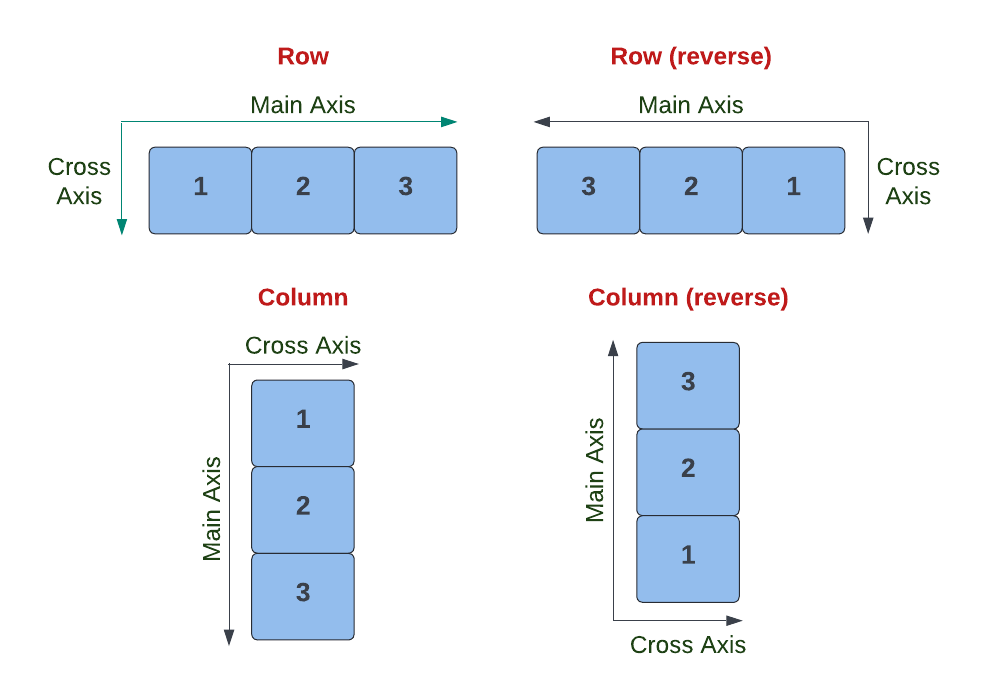
The (reverse) option is available through the .reverse(boolean) method on Row/Column objects.
When using container components like Row and Column, you must wrap child components in child(). For example:
Row {
  child(Text(text = "First"))
  child(Text(text = "Second"))
}
Distribution along the main axis
If your container has more space than is necessary along the Main Axis (primary axis of the layout) then the way children are positioned across that axis needs to be considered.
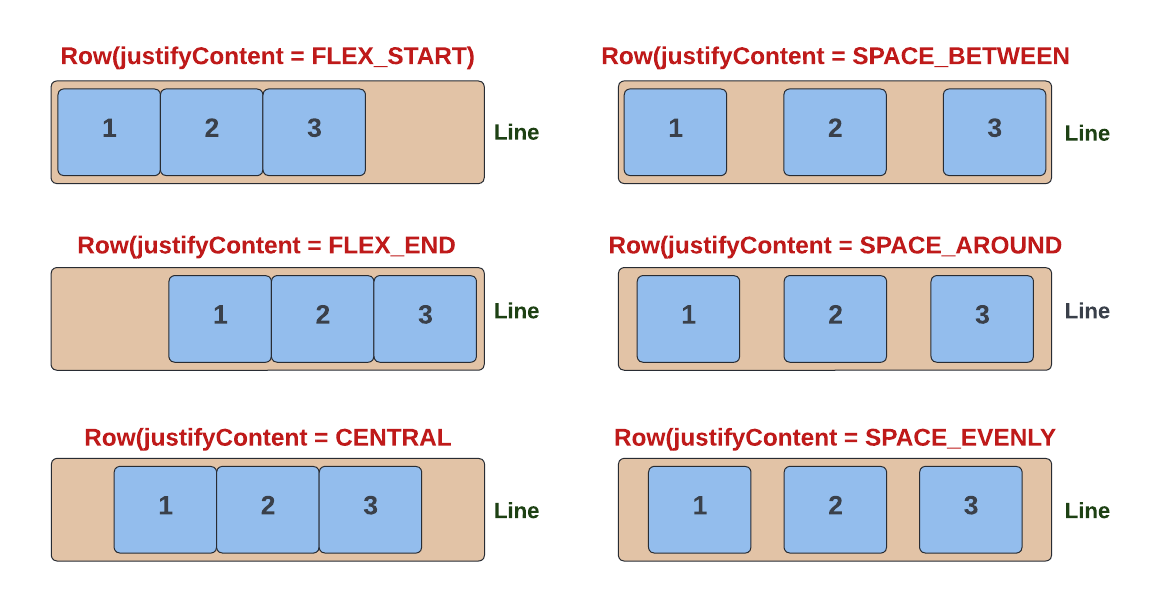
The justifyContent param specifies how the child elements are distributed across the Main Axis. It takes a YogaJustify enum input (needs import com.facebook.yoga.YogaJustify), which has the following possible values:
| YogaJustify value | Description | Row Example | Column Example |
|---|---|---|---|
| FLEX_START (default) | Position children at the start of the container, along the main axis. i.e. start of the Row or top of the Column (Visually: 123###) | Row(yogaJustify = YogaJustify.FLEX_START) { ... } | Column(yogaJustify = YogaJustify.FLEX_START) { ... } |
FLEX_END | Position children at the end of the container, along the main axis. i.e. end of the Row or bottom of the Column (Visually: ###123) | Row(yogaJustify = YogaJustify.FLEX_END) { ... } | Column(yogaJustify = YogaJustify.FLEX_END) { ... } |
CENTER | Position children in the centre of the container, along the main axis. i.e. equal spacing on start and end of Row, or top and bottom of Column (Visually: ##123##) | Row(yogaJustify = YogaJustify.CENTER) { ... } | Column(yogaJustify = YogaJustify.CENTER) { ... } |
SPACE_BETWEEN | Distribute extra space evenly between children (Visually: 1##2##3) | Row(yogaJustify = YogaJustify.SPACE_BETWEEN) { ... } | Column(yogaJustify = YogaJustify.SPACE_BETWEEN) { ... } |
SPACE_AROUND | Distribute space evenly around each child. Note that adjacent children will have '2x' space between them (because each child has its own 'padding') Visually: #1##2##3# | Row(yogaJustify = YogaJustify.SPACE_AROUND) { ... } | Column(yogaJustify = YogaJustify.SPACE_AROUND) { ... } |
SPACE_EVENLY | Distribute space evenly around all children (Visually: ##1##2##3##) | Row(yogaJustify = YogaJustify.SPACE_EVENLY) { ... } | Column(yogaJustify = YogaJustify.SPACE_EVENLY) { ... } |
The YogaJustify values are illustrated below.
Distribution along the cross axis
If the elements in your line have different heights, then the way they are positioned along the line needs to be considered.
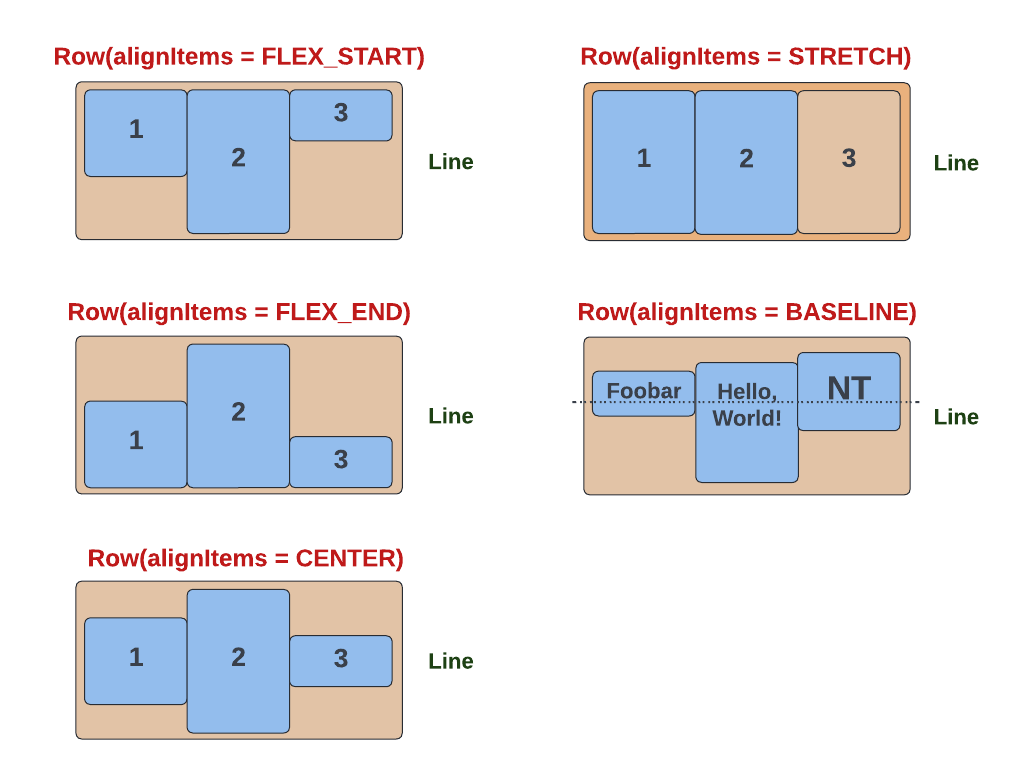
The alignItems method specifies how the container's children are distributed across the Cross Axis. It takes a YogaAlign enum input (needs import com.facebook.yoga.YogaAlign), which has the following possible values:
| YogaAlign value | Description | Row Example | Column Example |
|---|---|---|---|
STRETCH (default) | Stretch the size of all elements to completely fill the line. i.e. the height of the Row, or the width of the Column. | Row(yogaAlign = YogaAlign.STRETCH) { ... } | Column(yogaAlign = YogaAlign.STRETCH) { ... } |
FLEX_START | Align elements with the start of the cross axis. i.e. the top of the Row, or the left of the Column. | Row(yogaAlign = YogaAlign.FLEX_START) { ... } | Column(yogaAlign = YogaAlign.FLEX_START) { ... } |
FLEX_END | Align elements with the end of the cross axis. i.e. the bottom of the Row, or the right of the Column. | Row(yogaAlign = YogaAlign.FLEX_END) { ... } | Column(yogaAlign = YogaAlign.FLEX_END) { ... } |
CENTER | Align elements with the centre of the Row or Column i.e equal spacing on the top and bottom of Row, or left and right of a Column | Row(yogaAlign = YogaAlign.CENTER) { ... } | Column(yogaAlign = YogaAlign.CENTER) { ... } |
BASELINE | Align elements with respect to their baselines. | Row(yogaAlign = YogaAlign.BASELINE) { ... } | Column(yogaAlign = YogaAlign.BASELINE) { ... } |
The YogaAlign values are illustrated below.
Wrapping to multiple lines
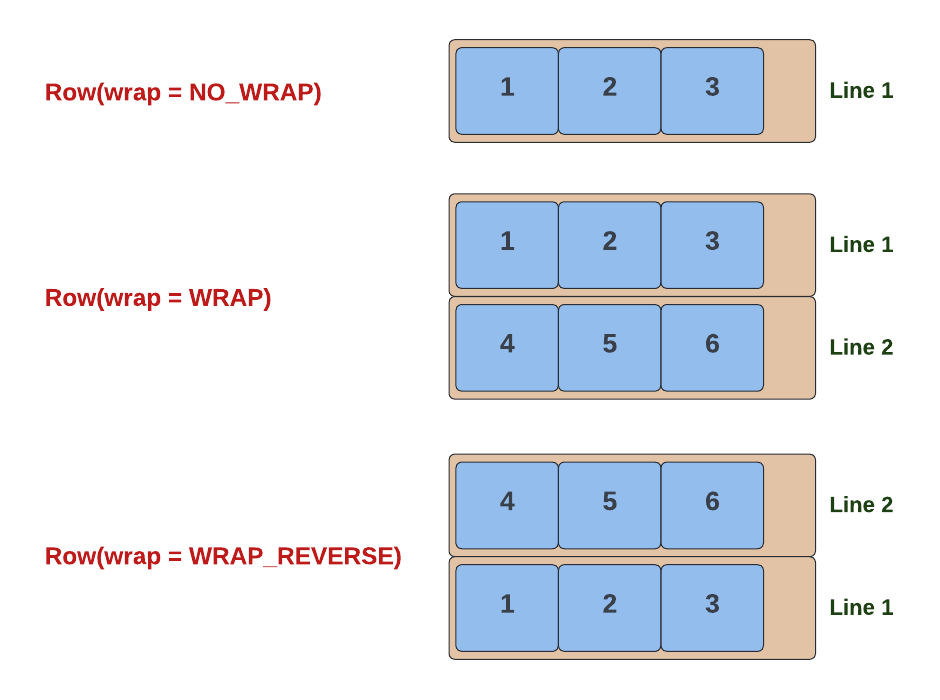
In addition to the one-dimensional Flexbox laying out its children in one line, Flexboxes can also wrap their children onto multiple lines, much like text wraps. Wrapping behavior is specified with the Wrap method, which takes a YogaWrap enum value (needs import com.facebook.yoga.YogaWrap) that has the following possible values:
| YogaWrap value | Description | Row Example | Column Example |
|---|---|---|---|
NO_WRAP (default, also called "nowrap") | There is no wrapping. Children are forced into a single line; if they cannot fit, they will overflow. | Row(wrap = YogaWrap.NO_WRAP) { ... } | Column(wrap = YogaWrap. NO_WRAP) { ... } |
WRAP | Elements that overflow a single line will be moved to the next line. If the main axis is horizontal, then the next line will be below the previous line (i.e. Row with elements one below the other when wrapped) and if the main axis is vertical, then the next line will be on right of previous line (i.e. Column with elements one next to the other when wrapped). | Row(wrap = YogaWrap.WRAP) { ... } | Column(wrap = YogaWrap.WRAP) { ... } |
WRAP_REVERSE | Similar to WRAP except the order of lines is reversed. If the main axis is horizontal, then the next line will be above the previous line (Row) and if the main axis is vertical then the next line will be left of the previous line (Column). | Row(wrap = YogaWrap.WRAP_REVERSE) { ... } | Column(wrap = YogaWrap.WRAP_REVERSE) { ... } |
The YogaWrap values are illustrated below.
Line distribution
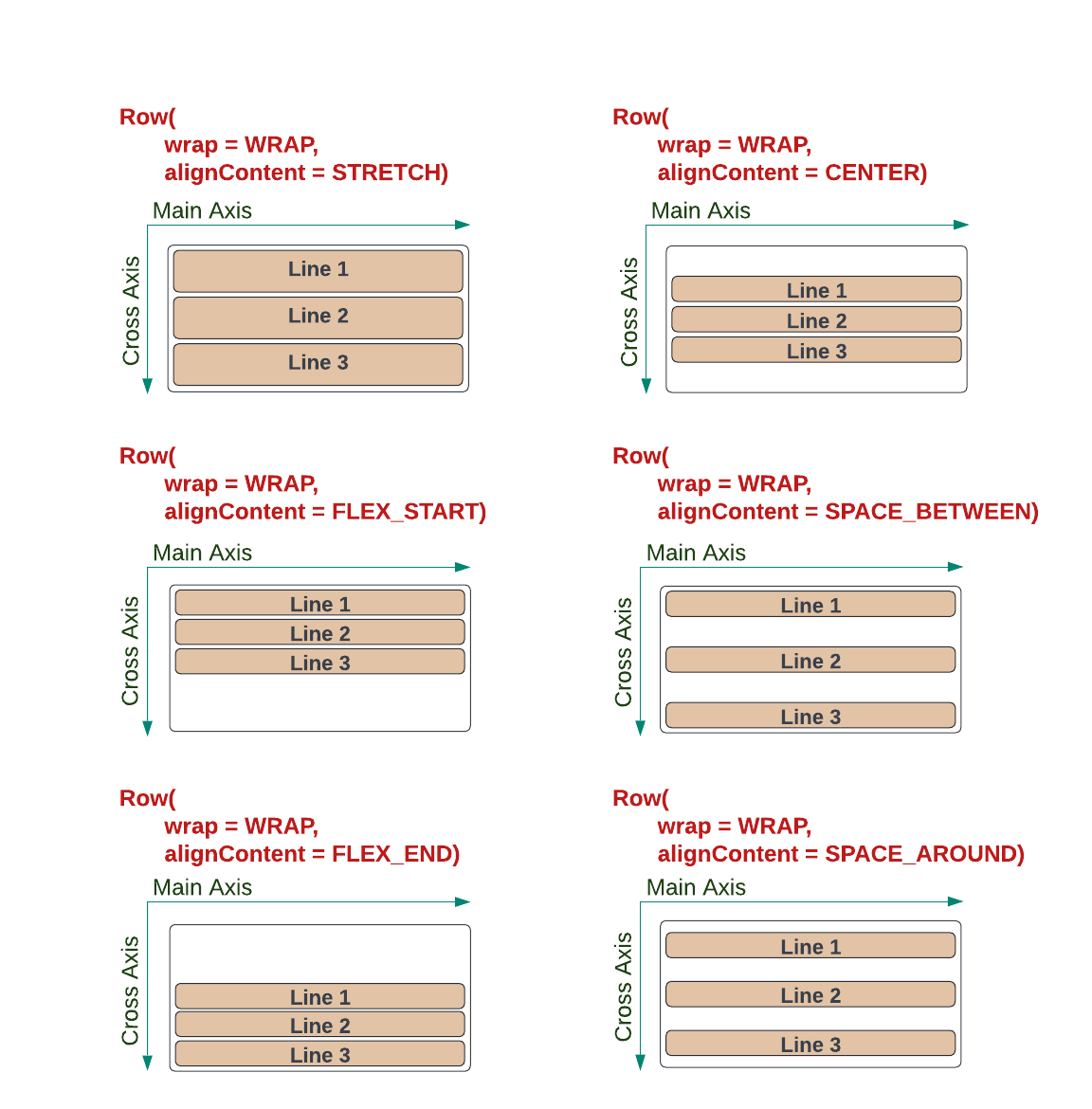
If the container has extra space in the Cross Axis direction (i.e. vertical for Row and horizontal for Column), then the way lines are distributed in that space needs to be considered.
The alignContent method specifies how lines are distributed along the Cross Axis. It takes a YogaAlign enum value (needs import com.facebook.yoga.YogaAlign), which has the following possible values:
| YogaWrap value | Description | Row Example | Column Example |
|---|---|---|---|
STRETCH (default) | Lines are stretched evenly to fill the available space in the cross axis. i.e. for Row, the elements in each line will be stretched equally to fill the height of the Row and for Column, the elements in each line will be stretched equally to fill the width of the Column. | Row(alignContent = YogaAlign.STRETCH) { ... } | Column(alignContent = YogaAlign.STRETCH) { ... } |
FLEX_START | Lines are placed at the start of the cross axis. i.e. top of the Row or left of the Column. | Row(alignContent = YogaAlign.FLEX_START) { ... } | Column(alignContent = YogaAlign.FLEX_START) { ... } |
FLEX_END | Lines are placed at the end of the cross axis. i.e. bottom of the Row or right of the Column | Row(alignContent = YogaAlign.FLEX_END) { ... } | Column(alignContent = YogaAlign.FLEX_END) { ... } |
CENTER | Lines are placed in the centre of the cross axis. i.e. equal spacing on top and bottom of the Row or left and right of the Column | Row(alignContent = YogaAlign.CENTER) { ... } | Column(alignContent = YogaAlign.CENTER) { ... } |
SPACE_BETWEEN | Evenly distributes extra space between all lines (Visually: 1#2#3) | Row(alignContent = YogaAlign.SPACE_BETWEEN) { ... } | Column(alignContent = YogaAlign.SPACE_BETWEEN) { ... } |
SPACE_AROUND | Pads lines above and below with extra space (Visually: #1#2#3#) | Row(alignContent = YogaAlign.SPACE_AROUND) { ... } | Column(alignContent = YogaAlign.SPACE_AROUND) { ... } |
The YogaAlign values, for Lines, are illustrated below.
Spacing between children with gap
To put uniform spacing between children, use the gap parameter on Row/Column. It is the equivalent of CSS gap and is almost always better than adding margin to each child by hand — manual margins are easy to get uneven (spacing on only some edges, or doubled-up spacing at the container edges).
gap is a constructor parameter on Row/Column — it is NOT a Style extension. There is no Style.gap(...), and there is nothing to import for it. Pass it directly to the container:
Row(gap = 8.dp) { /* 8.dp between each child; no extra space at the outer edges */ }
Column(gap = 12.dp) { ... }
For different spacing per axis (useful together with wrap), use mainAxisGap / crossAxisGap instead:
import com.facebook.yoga.YogaWrap

Row(wrap = YogaWrap.WRAP, mainAxisGap = 8.dp, crossAxisGap = 12.dp) { ... }
Prefer gap over per-child margin for any evenly-spaced row, column, or grid. Reach for margin only when a single child needs spacing that differs from the rest.
Building Grid Layouts with Rows (Grid Alignment for Partial Rows)
When building a grid layout (e.g., an image grid, a card grid), use Row with wrap = YogaWrap.WRAP so items flow into multiple lines. The critical rule: always use justifyContent = YogaJustify.FLEX_START so that items in partial (incomplete) rows stay left-aligned instead of being centered or spread out.
import com.facebook.litho.Column
import com.facebook.litho.Row
import com.facebook.litho.Style
import com.facebook.litho.core.height
import com.facebook.litho.core.width
import com.facebook.rendercore.dp
import com.facebook.yoga.YogaJustify
import com.facebook.yoga.YogaWrap

// 2-column image grid — partial last row stays LEFT-aligned
Row(
    justifyContent = YogaJustify.FLEX_START, // ← keeps partial rows left-aligned
    wrap = YogaWrap.WRAP,
    gap = 8.dp,
) {
    // Each item takes ~half the width
    child(ImageCard(style = Style.width(180.dp).height(180.dp)))
    child(ImageCard(style = Style.width(180.dp).height(180.dp)))
    child(ImageCard(style = Style.width(180.dp).height(180.dp))) // partial row — stays at left
}
Common mistakes:
- Using
YogaJustify.CENTERorYogaJustify.SPACE_BETWEENcauses partial-row items to be centered or spread out. Always useFLEX_START. - Using
flex(basis = 0.dp, grow = 1f)on grid items — this defeats wrapping because items start at zero width and all fit in one row. Useflex(basisPercent = 48f)(for 2 columns, leaving room for gap) or fixed widths to force wrapping.
Grid Items with Percentage Width (flex basisPercent)
For responsive grids, use flex(basisPercent = ...) to set each item's width as a percentage of the container. This ensures items wrap correctly:
import com.facebook.litho.Style
import com.facebook.litho.flexbox.aspectRatio
import com.facebook.litho.flexbox.flex
import com.facebook.litho.kotlin.widget.Image
import com.facebook.litho.layout.flexbox.Column
import com.facebook.litho.layout.flexbox.Row
import com.facebook.rendercore.dp
import com.facebook.yoga.YogaJustify
import com.facebook.yoga.YogaWrap

// 2-column image grid using basisPercent — items WRAP to next row
Row(
    justifyContent = YogaJustify.FLEX_START,
    wrap = YogaWrap.WRAP,
    gap = 8.dp,
) {
    // Each item takes ~48% width (leaving room for gap) → 2 per row, 3rd wraps
    child(Image(drawable = placeholder, style = Style.flex(basisPercent = 48f).aspectRatio(1.5f)))
    child(Image(drawable = placeholder, style = Style.flex(basisPercent = 48f).aspectRatio(1.5f)))
    child(Image(drawable = placeholder, style = Style.flex(basisPercent = 48f).aspectRatio(1.5f))) // wraps to second row, left-aligned
}
Alternatively, build grids manually with Column of Rows. The same rule applies — use justifyContent = YogaJustify.FLEX_START on each Row:
// Manual 2-column grid
val cellStyle = Style.flex(grow = 1f, basis = 0.dp)

Column(gap = 8.dp) {
    // Full row
    child(Row(justifyContent = YogaJustify.FLEX_START, gap = 8.dp) {
        child(ImageCard(style = cellStyle.aspectRatio(1.5f)))
        child(ImageCard(style = cellStyle.aspectRatio(1.5f)))
    })
    // Partial row — single item stays left-aligned, use same width as above
    child(Row(justifyContent = YogaJustify.FLEX_START, gap = 8.dp) {
        child(ImageCard(style = cellStyle.aspectRatio(1.5f)))
        // Empty spacer to keep consistent sizing
        child(Column(style = cellStyle))
    })
}
For non-wrapping rows, a common zero basis makes final widths follow the grow ratios instead of
each child's measured size. For wrapping rows, use an explicit or percentage basis instead.
For more information on specific Flexbox properties, refer to the Yoga documentation or explore any web resource on how Flexbox functions.