Persisting Values Across Renders
Signature: fun <T> ComponentScope.useState(initializer: () -> T): State<T>
| Method | Signature | Description |
|---|---|---|
value | State<T>.value: T | Get current state value (snapshot for this render) |
update | update(newValue: T) | Async state update with direct value |
update | update(updater: (T) -> T) | Async update with lambda (use for dependent updates) |
updateSync | updateSync(newValue: T) | Synchronous state update with direct value |
updateSync | updateSync(updater: (T) -> T) | Synchronous update with lambda |
Variant with Dependencies:
fun <T> ComponentScope.useStateWithDeps(vararg deps: Any?, initializer: () -> T): State<T>
useStateWithDeps re-initializes the state when any dependency changes (without triggering re-render).
Import:
import com.facebook.litho.useState
import com.facebook.litho.useStateWithDeps
useState is a hook that allows a component to persist and update a single value across renders and is the most common hook you'll encounter.
To familiarize yourself with the concept and rules for hooks, see the Introduction to Hooks page.
Declaring and Using State
Declare state with useState, passing an initial value. useState will always return a State<T> holding whatever the current value of that state is. On the first render, this is the initial value, however in subsequent renders it will include any updates that have been committed for that state variable.
The following code shows an example of a component that renders a counter that increments when it is clicked. useState is used to track the value of that counter over time:
import com.facebook.litho.ClickEvent
import com.facebook.litho.Component
import com.facebook.litho.ComponentScope
import com.facebook.litho.KComponent
import com.facebook.litho.Style
import com.facebook.litho.kotlin.widget.Text
import com.facebook.litho.useCallback
import com.facebook.litho.useState
import com.facebook.litho.view.onClick

class CounterComponent : KComponent() {
  override fun ComponentScope.render(): Component {
    val clicks = useState { 0 }
    val onClick = useCallback<ClickEvent, Unit> { clicks.update { c -> c + 1 } }
    return Text(
        style = Style.onClick(action = onClick),
        text = "Clicks: ${clicks.value}")
  }
}
Because the click handler captures state, useCallback preserves its identity across renders while
keeping the captured state current. Pass the typed callback directly to Style.onClick instead of
wrapping it in another lambda.
Updating State
update causes the re-render to be async by default. If you need to perform a synchronous state update (that is, one which will cause a re-render synchronously on the current thread), use updateSync.
To update state, use the update method on the State<T> returned from useState. This will trigger a render pass with the new state value:
class CheckboxComponent : KComponent() {
  override fun ComponentScope.render(): Component {
    val isChecked = useState { false }

    return Column(style = Style.onClick { isChecked.update { currValue -> !currValue } }) {
      child(
          Image(
              drawable =
                  drawableRes(
                      if (isChecked.value) {
                        android.R.drawable.checkbox_on_background
                      } else {
                        android.R.drawable.checkbox_off_background
                      },
                  ),
          ),
      )
    }
  }
}
Value vs. Lambda variants
update and updateSync have two variants:
- Value variant - takes a determined value, such as
myState.update(1). - Lambda variant - takes a lambda receiving the old value which can be used to compute a new value, such as
myState.update { c -> c + 1 }.
The basic rule of thumb is: use the lambda variant when you need to perform an update that depends on the old state value. This is because value on State is a snapshot of that state for the current render and may not reflect any renders that have occurred since (or are currently occurring on other threads).
For example, if your state update increments a counter, then using the function version of update with count -> count + 1 enables you to account for updates that are in flight but not yet applied (such as if the user has tapped a button triggering the update multiple times in succession).
Using state in child components
Avoid passing a State directly to the child component. Instead, pass a lambda to the child which it can invoke to notify the parent to update the state:
class StateParentChildComponent : KComponent() {
  override fun ComponentScope.render(): Component {
    val clicks = useState { 0 }
    return Column {
      child(ChildComponent(onIncrementCounter = { clicks.update { c -> c + 1 } }))
      child(Text(text = "Counter: ${clicks.value}"))
    }
  }
}
And then in the child component:
class ChildComponent(private val onIncrementCounter: () -> Unit) : KComponent() {
  override fun ComponentScope.render(): Component {
    return Text(
        style = Style.onClick { onIncrementCounter() },
        text = "Tap to increment the parent!",
    )
  }
}
Batching Updates
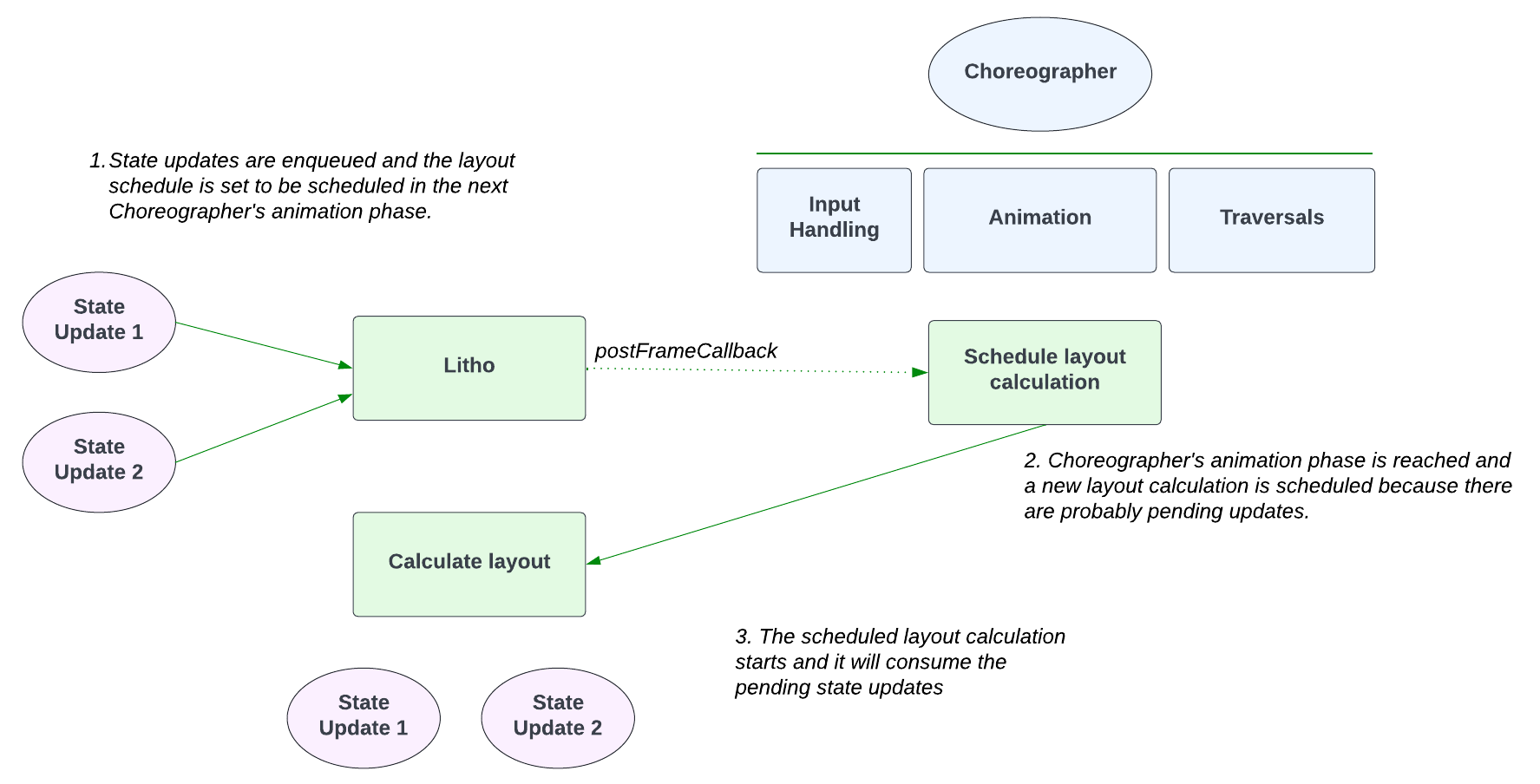
Litho has an internal mechanism where it batches state updates to avoid the scenario of doing one layout re-calculation per state update (and corresponding mount) and, therefore become more performant.
Internally, Litho achieves this by leveraging the lifecycle of the Choreographer API and how it breaks down its different work phases. Whenever the Choreographer receives a VSYNC signal,
it starts a cycle to prepare the next Frame. In this cycle, it goes through 3 main phases:
- Input handling
- Animation (which layouts, measures, and draws)
- Traversals
When Litho enqueues a new state update, it will schedule its layout calculation on the Choreographer's next animation phase. This way, any subsequent state update enqueued before the next animation phase will
be taken into account in the following layout calculation (and not re-schedule any more work).
Common Patterns
Use the lambda variant of update when the new value depends on the old value:
// ✅ Correct - accounts for concurrent updates
count.update { c -> c + 1 }
Don't use value for dependent updates - may miss concurrent updates:
// ❌ Incorrect - may miss updates if called rapidly
count.update(count.value + 1)
Pass update lambdas to children instead of State objects:
// ✅ Correct - child receives callback
ChildComponent(onUpdate = { newValue -> myState.update(newValue) })
For optimal read tracking, pass lambdas that read state inside the child:
// ✅ Optimal - state read occurs in proper phase when lambda is invoked
ChildComponent(
  getCount = { count.value },  // State read deferred until invocation
  onIncrement = { count.update { c -> c + 1 } }
)
This allows the state read to happen at the appropriate time during rendering, which can improve performance with read tracking.
Don't pass State directly to child components:
// ❌ Incorrect - breaks encapsulation
ChildComponent(state = myState)
State with Dependencies (useStateWithDeps)
useStateWithDeps extends useState by re-initializing state when any of its dependencies change. This is useful for derived or dependent state that should reset when inputs change.
Key Differences from useState
| Feature | useState | useStateWithDeps |
|---|---|---|
| Initialization | Only on first render | On first render + when deps change |
| Dependencies | None | Requires one or more deps |
| Auto-reset | No | Yes, when deps change |
| Triggers re-render | Only via update() | Only via update() (not from re-init) |
When to Use
Use useStateWithDeps when:
- State should reset/clear when any dependencies change
- Implementing "derived state" that depends on other values
Use useState when:
- State is independent of other values
- You want manual control over all state updates
- State should persist across prop changes
Basic Example
The following example shows a search interface where the result message automatically resets when the search text changes:
/**
 * Example demonstrating useStateWithDeps.
 *
 * This component shows a search box where the search result message is reset whenever the search
 * text changes. The key difference from useState is that useStateWithDeps re-initializes the state
 * value when any of its dependencies change.
 *
 * In this example:
 * - searchText is a dependency for resultMessage
 * - When searchText changes, resultMessage is automatically reset to empty string
 * - This happens without an explicit update call
 * - The re-initialization itself doesn't trigger a re-render
 */
@OptIn(ExperimentalLithoApi::class)
class UseStateWithDepsExampleComponent : KComponent() {

  override fun ComponentScope.render(): Component {
    // Regular state for search text
    val searchText = useState { "" }

    // State with dependency: automatically resets when searchText changes
    // This is useful for clearing derived state when inputs change
    val resultMessage = useStateWithDeps(searchText.value) { "" }

    return Column(style = Style.padding(all = 16.dp)) {
      child(
          Text(
              text = "Search with Auto-Reset Result",
              textSize = 20.dp,
              style = Style.margin(bottom = 16.dp),
          ),
      )

      // Search input
      child(
          TextInput(
              initialText = searchText.value,
              textSize = 16.dp,
              hint = "Type to search...",
              inputBackground = null,
              onTextChanged = { event -> searchText.update(event.text) },
              style = Style.height(48.dp).margin(bottom = 8.dp),
          ),
      )

      // Search button that sets result message
      child(
          Row(style = Style.margin(bottom = 16.dp)) {
            child(
                Text(
                    text = "Search",
                    textSize = 16.dp,
                    style =
                        Style.padding(all = 12.dp).margin(end = 8.dp).onClick {
                          // When search is clicked, show result
                          // If user then changes searchText, resultMessage will auto-reset to ""
                          resultMessage.update("Results for: \"${searchText.value}\"")
                        },
                ),
            )
            child(
                Text(
                    text = "Clear",
                    textSize = 16.dp,
                    style =
                        Style.padding(all = 12.dp).onClick {
                          // Clear search text, which also auto-resets resultMessage
                          searchText.update("")
                        },
                ),
            )
          },
      )

      // Display result message (resets automatically when searchText changes)
      child(
          Text(
              text =
                  if (resultMessage.value.isEmpty()) {
                    "Type and click Search. Result will reset when you change the text."
                  } else {
                    resultMessage.value
                  },
              textSize = 14.dp,
              style = Style.margin(top = 8.dp),
          ),
      )

      // Explanation text
      child(
          Text(
              text =
                  "\n\nHow it works:\n" +
                      "• resultMessage depends on searchText.value\n" +
                      "• When searchText changes, resultMessage resets to \"\"\n" +
                      "• No explicit reset call needed\n" +
                      "• Try: Click Search, see result, then type more text",
              textSize = 12.dp,
              style = Style.margin(top = 16.dp),
          ),
      )
    }
  }
}
How It Works
Declaration: Pass dependencies as varargs before the initializer:
val state = useStateWithDeps(dep1, dep2) { initialValue }Re-initialization: When any dependency changes (checked with
areObjectsEquivalent), the initializer runs again and state is set to the new value.No Auto Re-render: Re-initialization updates the state value but doesn't trigger a re-render by itself. Re-renders happen from:
- Explicit
state.update()calls - Parent component re-renders
- Other state changes
- Explicit
Multiple Dependencies
You can pass multiple dependencies. State re-initializes when any dependency changes:
val state = useStateWithDeps(userId, filter, sortOrder) {
  // Re-initializes whenever userId, filter, or sortOrder changes
  loadInitialData(userId, filter, sortOrder)
}
Common Patterns
Automatically clear error messages when user changes input:
val userInput = useState { "" }
// Error message clears when input changes
val errorMessage = useStateWithDeps(userInput.value) { "" }

// Later: set error on validation
if (!isValid(userInput.value)) {
  errorMessage.update("Invalid input")
}
// When user types again, errorMessage automatically resets to ""
Initialize state based on props that may change:
@Prop val userId: String

override fun ComponentScope.render(): Component {
  // When userId changes, userProfile resets to loading state
  val userProfile = useStateWithDeps(userId) {
    ProfileData(status = Status.LOADING)
  }

  // Trigger load on userId change via useEffect
  useEffect(userId) {
    loadProfile(userId) { profile ->
      userProfile.update(profile)
    }
  }
  // ...
}
Don't use useStateWithDeps when useState suffices:
// ❌ Unnecessary - no dependencies needed
val count = useStateWithDeps() { 0 }

// ✅ Correct - use useState for independent state
val count = useState { 0 }
Don't use dependencies just to trigger updates you could do manually:
// ❌ Complicated - unnecessary dependency
val input = useState { "" }
val upper = useStateWithDeps(input.value) { input.value.uppercase() }

// ✅ Better - use useCached for pure computations
val upper = useCached(input.value) { it.uppercase() }
For pure computations on state, prefer useCached instead.
Side Effects vs. Re-initialization
useStateWithDeps is for state re-initialization, not side effects:
// ✅ Correct use: re-initialize state when userId changes
val profileData = useStateWithDeps(userId) {
  ProfileData(status = Status.LOADING)
}

// ❌ Incorrect: side effects belong in useEffect
val data = useStateWithDeps(userId) {
  fetchData(userId) // Don't do this!
  Data()
}

// ✅ Correct: use useEffect for side effects
useEffect(userId) {
  fetchData(userId) { result ->
    profileData.update(result)
  }
}
Use useEffect for side effects that should run when dependencies change.
See Also
- Introduction to Hooks - Hook fundamentals and rules
- useEffect - Side effects and lifecycle management
- useCached - Cache expensive computations
- useRef - Mutable references without re-renders
- Props vs State - When to use state vs props